Why Your RV Inverter Keeps Failing (And How to Fix It Fast)
Updated:
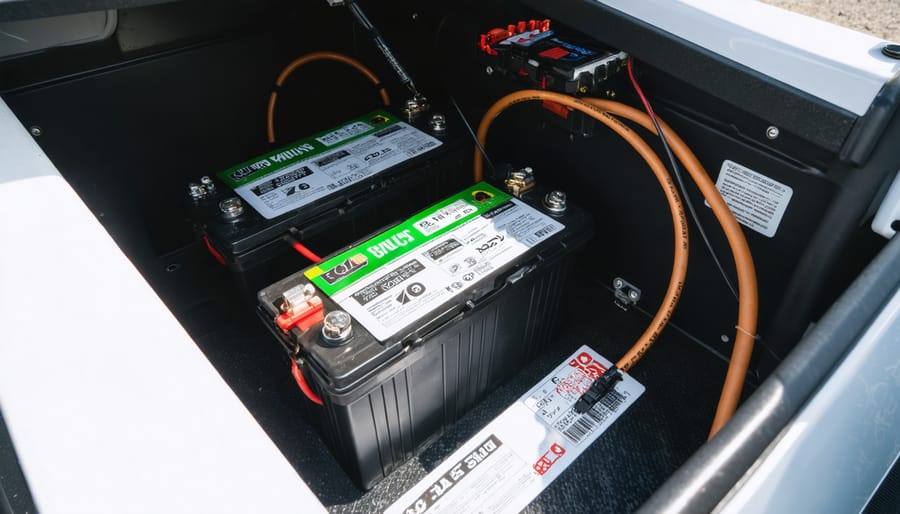
Check your battery connections first—loose or corroded terminals account for nearly 60% of inverter issues I’ve seen in my years working with RV solar systems. Remove both positive and negative cables, clean them with a wire brush and baking soda solution, then reconnect tightly. While you’re at it, use a multimeter to verify your battery bank voltage reads at least 12.4 volts when disconnected from loads; anything lower means your batteries lack sufficient charge to power the inverter properly.
Test the inverter with a simple appliance like a phone charger or lamp rather than complex electronics. If small loads work but larger ones trigger shutdowns, you’re likely exceeding your inverter’s continuous wattage rating or surge capacity. Calculate your actual power draw—remember that many appliances require 2-3 times their running wattage at startup.
Inspect your wire gauge and run length between batteries and inverter. Undersized cables create voltage drop that starves your inverter, especially under load. For a 2000-watt inverter, you need minimum 2/0 AWG cable for runs under 5 feet, with even heavier gauge for longer distances.
Listen for the cooling fan and check ventilation around your inverter. Overheating triggers automatic shutdowns that mimic other problems. I once spent two hours diagnosing an inverter that simply needed the storage compartment door left open during heavy use. Clear any obstructions and ensure at least three inches of airflow space on all sides.
Understanding Your RV Inverter Before Things Go Wrong
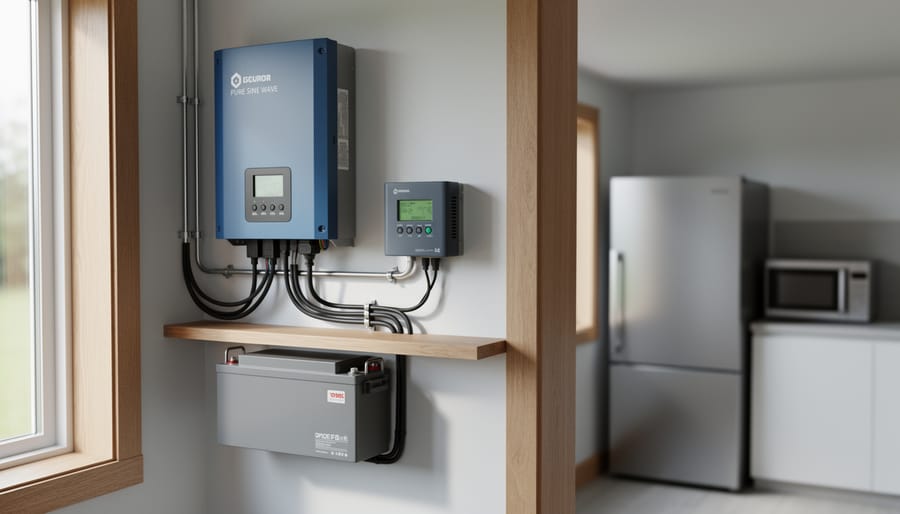
Understanding the key components and indicators on your RV inverter is the first step in effective troubleshooting.
What Your Inverter Actually Does
Think of your RV inverter as a translator between two different electrical languages. Your RV’s batteries store power in direct current (DC), the same type that flows through flashlights and cell phones. But most of your everyday appliances speak alternating current (AC), the language of household electricity.
When I first started RVing full-time, I pictured the inverter as a tiny power plant inside my rig, constantly flipping DC power back and forth to create that alternating wave pattern your appliances expect. It’s pretty amazing when you think about it.
Without your inverter working properly, you can’t run things like your coffee maker, laptop charger, television, microwave, or hair dryer. These AC appliances simply won’t recognize the steady DC power coming from your batteries. Some RVers get frustrated when their inverter stops working, not realizing it’s literally the bridge between stored solar energy and morning coffee.
The beauty of understanding this conversion process is recognizing why certain problems occur. When your inverter acts up, it’s usually struggling with the translation process, and knowing what it’s trying to accomplish helps you troubleshoot smarter, not harder.
The Two Types You’ll Encounter
Before you dive into troubleshooting, it helps to know which inverter type you’re working with. RV inverters come in two main flavors, and understanding the difference can save you headaches down the road.
Pure sine wave inverters produce smooth, clean electricity that mimics what you get from the grid. They’re the gold standard for RVs because they work flawlessly with sensitive electronics like laptops, medical devices, and modern appliances with digital displays. I learned this lesson the hard way when my modified sine wave inverter caused my microwave to hum loudly and eventually burn out.
Modified sine wave inverters are budget-friendly alternatives that produce choppier power. They’ll run basic devices like lights, fans, and simple tools without issue, but can cause problems with anything that has a microprocessor or digital circuitry. You might notice buzzing sounds, reduced efficiency, or even premature equipment failure.
Most modern RVers opt for pure sine wave inverters despite the higher cost. They’re more reliable, protect your expensive electronics, and troubleshooting is often more straightforward since you’re not dealing with power quality issues masquerading as inverter problems.
The Most Common RV Inverter Problems (And Their Warning Signs)
Inverter Won’t Turn On At All
When your RV inverter shows absolutely no signs of life, it can feel pretty overwhelming. I remember the first time mine refused to turn on during a camping trip, and I panicked thinking I’d need an expensive replacement. Turns out, it was just a blown fuse! Let’s walk through the systematic checks that’ll help you identify the culprit.
Start with the easiest possibilities first. Check your inverter’s main fuse or circuit breaker. These safety devices are designed to blow or trip when something goes wrong, protecting your equipment from damage. Look for a blown fuse (you’ll often see a broken wire inside) or a tripped breaker that needs resetting. Many inverters have these right on the unit itself.
Next, verify all your cable connections. Vibration from travel can loosen battery cables and power connections over time. Make sure the positive and negative cables are securely attached at both the battery and inverter ends. Even slightly loose connections can prevent your inverter from powering up.
Now test your battery voltage with a multimeter. A 12-volt battery should read at least 12.4 volts when fully charged. Anything below 11.5 volts means your battery is too depleted to power the inverter. If the battery’s dead, you’ve found your problem. Charge it up and try again before assuming the inverter itself has failed.
Power Cuts Out Randomly or Under Load
Random power cuts are frustrating, but the good news is they’re usually trying to tell you something specific. I learned this the hard way when my inverter kept shutting down during coffee-making mornings – it turned out I was asking too much from a 1000W inverter.
The most common culprit is overloading. If your inverter cuts out when you start an appliance, add up the wattage of everything running simultaneously. Don’t forget that devices with motors (like microwaves or air conditioners) need extra surge power at startup, sometimes double their running wattage. If you’re exceeding your inverter’s capacity, you’ll need to stagger your power use or upgrade to a larger unit.
Low battery voltage is another frequent issue. Most inverters automatically shut down when voltage drops too low to protect your batteries. Check your battery voltage with a multimeter – if it’s below 11.5V under load, your batteries need charging or might be reaching end-of-life.
Thermal shutdown happens when your inverter gets too hot, usually from poor ventilation or extended heavy use. Feel the inverter case (carefully!) – if it’s uncomfortably hot, improve airflow around it and consider adding a small fan.
Here’s a quick diagnosis trick: if shutdown happens immediately when starting an appliance, it’s likely overload. If it happens after several minutes of use, suspect thermal issues. If it happens seemingly randomly regardless of load, check your battery voltage first.
Strange Beeping or Alarm Sounds
Your inverter’s alarm system is actually trying to help you by communicating what’s wrong. Think of those beeps as your inverter speaking to you in Morse code. Different inverter beeping sounds indicate specific issues, and once you learn the language, troubleshooting becomes much easier.
Most inverters use a combination of beeping patterns and LED lights to signal problems. A continuous beep typically means overload, where you’re drawing too much power at once. Intermittent beeping often indicates low battery voltage or an overheat warning. Meanwhile, rapid beeping usually signals a more serious fault condition requiring immediate attention.
LED patterns vary by brand, but common indicators include green for normal operation, yellow or amber for warnings like low battery, and red for critical faults. Some models flash these lights in sequences, like three quick flashes for overload or steady red for shutdown mode.
Here’s my tip from experience: grab your inverter’s manual and create a quick reference card with the beep patterns and LED meanings specific to your model. Keep it taped inside your electrical bay door. When an alarm sounds at 2 AM during a camping trip, you’ll thank yourself for having that cheat sheet handy instead of fumbling through a full manual by flashlight.
Inverter Gets Too Hot
Here’s the thing about inverter heat – it’s usually totally normal, but it can cross into problem territory if you’re not careful. I remember the first summer I ran my RV inverter, I touched the casing and nearly panicked at how warm it felt. Turns out, inverters generate heat during normal operation, especially under heavy loads. That’s just physics doing its thing.
The real question is: when should you worry? If your inverter feels uncomfortably hot to touch for more than a second or two, or if it’s shutting down due to overheating, you’ve got a ventilation problem. Check that your inverter has at least three to four inches of clearance on all sides. I’ve seen too many folks mount these things in tight cabinets with zero airflow, essentially creating a heat trap.
Look at your installation spot. Is it in direct sunlight? Near your engine compartment? These ambient temperature factors matter more than you’d think. On scorching summer days, an inverter in a poorly ventilated space can easily overheat even when it’s working perfectly fine.
Clean any dust buildup from cooling fans and vents using compressed air. Consider adding a small auxiliary fan if your installation space is cramped. Some inverters also have adjustable temperature settings – check your manual to see if lowering the thermal shutdown threshold might help you catch problems earlier.
Your Step-by-Step Troubleshooting Checklist
Start With the Basics (5-Minute Safety Checks)
Before you dive into complex diagnostics, let’s start with the quick wins. I learned this the hard way during a trip to Joshua Tree when my inverter quit working right before sunset. After an hour of panic, I discovered the issue was embarrassingly simple: a loose battery connection. Now I always begin with these five-minute checks that solve about 60% of inverter problems.
First, grab your multimeter or even just a voltmeter app if your RV has Bluetooth battery monitoring. Check your battery voltage directly at the battery terminals. You’re looking for at least 12.4 volts for a rested 12V system, or 24.8 volts for a 24V setup. Anything below 12 volts means your batteries are too depleted to power the inverter properly, regardless of how well everything else works.
Next, inspect every connection between your batteries and inverter. I mean really look at them. Are the terminals tight? Any white or green crusty buildup? Give each connection a gentle wiggle. If anything moves, that’s your problem. Corrosion acts like an insulator, blocking the power flow your inverter desperately needs.
Now locate your inverter’s fuse or circuit breaker. Sometimes it’s right on the unit, other times it’s in a separate fuse box. Is the breaker tripped? Is the fuse blown? You can often tell just by looking, though testing with a multimeter confirms it.
Finally, do a quick visual scan of the inverter itself. Any burn marks, unusual smells, or melted plastic? These obvious signs point to more serious issues that need professional attention.
Testing Your Power Flow
Here’s where things get real – time to grab your multimeter and play detective! I’ll be honest, the first time I used one of these in my RV, I felt a bit intimidated. But Charles, my mentor from my early solar days, showed me it’s really just asking two simple questions: “Is power coming in?” and “Is power going out?”
Start with your inverter switched off. Set your multimeter to DC voltage (usually marked with a “V” and straight line). Touch the red probe to the positive terminal on your battery bank and the black probe to the negative. You should see between 12-14 volts for a 12V system, or 24-28 volts for a 24V system. Anything significantly lower means your batteries need attention before we blame the inverter.
Now check the inverter’s DC input terminals the same way. If the battery voltage looks good but the inverter input reads zero or much lower, you’ve found your culprit – probably a blown fuse, tripped breaker, or corroded connection between the battery and inverter.
Next, switch your multimeter to AC voltage (marked “V” with a wavy line). Turn the inverter on and carefully test the AC output outlets. You should read around 110-120 volts. Getting proper DC input but no AC output? Your inverter itself likely has internal issues.
This simple process isolates whether problems exist before, inside, or after your inverter – saving you hours of guesswork and potentially unnecessary purchases.
Using a multimeter to check voltage is an essential skill for diagnosing inverter power issues.
Load Testing and Capacity Issues
I learned this lesson the hard way during my first summer RVing through Arizona. My inverter kept shutting down every time I tried to make coffee while the fridge was running. Turns out, I wasn’t accounting for surge watts – those brief power spikes when appliances start up.
Here’s how to determine if your inverter can handle your actual needs. First, list every device you might run simultaneously. Check each one’s wattage rating (usually on a sticker or in the manual). Add these together for your continuous wattage requirement. But here’s the catch: many appliances need 2-3 times their running wattage just to start up. Your coffee maker might only use 600 watts while brewing, but it needs 1,200 watts for those first few seconds.
Try this simple calculation: add up your continuous loads, then identify your highest surge device. If you have a 1,500-watt inverter but your microwave needs 1,800 watts to start, you’ve found your problem.
Most RVers discover they’re running too close to their inverter’s capacity. Leave yourself a 20-25% buffer for safety and longevity. If your calculations show you’re consistently drawing 1,200 watts from a 1,500-watt inverter, it’s time to either upgrade your inverter or rethink which appliances you run together. Your inverter will thank you with years of reliable service.
When to Check Your Battery Bank
Your battery bank is the heart of your inverter system, and I learned this the hard way during a weekend trip to Joshua Tree. My inverter kept shutting down randomly, and I was convinced it was faulty. Turns out, my batteries were simply past their prime and couldn’t deliver the consistent power my inverter needed.
Here’s the thing: even if your inverter is working perfectly, weak or failing batteries will cause all sorts of frustrating problems. You might notice the inverter cutting out under load, displaying low voltage warnings, or simply refusing to start up. These symptoms often point directly to battery issues rather than inverter problems.
checking battery health should be your first troubleshooting step. Start with a simple voltage test using a multimeter. A fully charged 12V battery should read around 12.6-12.8 volts when at rest. Anything below 12.4 volts suggests the battery needs charging or might be struggling.
Also check for corroded terminals, which create resistance and prevent proper power flow. Clean white or green buildup with a wire brush and baking soda solution. If your batteries are over three years old and showing multiple symptoms, they might need replacement rather than troubleshooting.
Quick Fixes for the Most Frustrating Issues
Resetting Your Inverter the Right Way
Sometimes your inverter just needs a fresh start—like rebooting your computer when it freezes. But here’s the thing I learned the hard way after troubleshooting my own RV setup: resets are helpful for temporary glitches, not permanent fixes for underlying issues.
Most inverters have a simple reset process. First, turn off all connected devices and switch the inverter to the off position. Wait 30 seconds (I count to 40 to be safe), then turn it back on. If you’re dealing with an overload situation, check out our guide on resetting an overloaded inverter for specific steps.
Brand-specific tips: Xantrex models often have a reset button you hold for 5 seconds. Victron inverters may require disconnecting from both AC and DC power sources for a full reset. Always check your manual first.
Here’s the reality check—if you’re resetting daily, you’re masking a deeper problem. Frequent resets usually mean overloading, loose connections, or failing components. A reset should be an occasional fix, not a daily ritual. Think of it as a diagnostic tool: if the problem disappears permanently after one reset, great. If it keeps returning, dig deeper.
Improving Cooling and Ventilation
Heat is probably the biggest enemy of your RV inverter, and I learned this the hard way during a scorching summer trip through Arizona. My inverter kept shutting down every afternoon until I realized it was practically suffocating in its compartment. Let me help you avoid that frustration.
Start by inspecting your inverter’s cooling fans. Over time, these can get clogged with dust, pet hair, and road debris. Turn off your inverter completely, then use a soft brush or compressed air to gently clean the fan blades and vents. I do this every couple of months, and it makes a noticeable difference in performance.
Check the clearance around your inverter. Most manufacturers recommend at least 2-3 inches of space on all sides for proper airflow. If your inverter is crammed into a tight space, you’re asking for thermal shutdowns. Sometimes the simplest fix is removing unnecessary items stored nearby that might be blocking ventilation.
Consider adding an auxiliary fan if your compartment doesn’t get much natural airflow. Small 12-volt computer fans work great and draw minimal power. Mount one to pull hot air out of the enclosure, creating better circulation.
If you’re still experiencing overheating issues, relocation might be necessary. Look for a cooler spot with better ventilation, away from other heat sources like your water heater or generator. Yes, it’s more work, but preventing thermal shutdowns beats dealing with constant interruptions during your adventures.
Preventive Maintenance That Actually Matters
Monthly Quick Checks
I learned this lesson the hard way during a summer trip through Arizona when my RV inverter suddenly shut down in 110-degree heat. After an expensive service call, the technician found nothing but dust bunnies clogging the vents. Now I set a monthly reminder on my phone, and these five-minute checks have saved me countless headaches.
Start by visually inspecting all connections at both the inverter and battery terminals. Look for any corrosion (that white or green crusty stuff), loose wires, or frayed insulation. Gently wiggle connections to ensure they’re snug, but don’t overtighten.
Next, grab a microfiber cloth or soft brush and clear away any dust buildup around the inverter’s cooling vents. These devices generate heat during operation, and blocked airflow is a leading cause of unexpected shutdowns. If you’re in a dusty environment, consider checking weekly instead.
Finally, turn on your inverter and listen carefully for unusual sounds. A quiet hum or gentle fan noise is normal, but grinding, clicking, or high-pitched whining deserves immediate attention. While you’re at it, sniff around the unit. Any burning smell or unusual odors could indicate internal problems developing.
Think of these quick checks like brushing your teeth – boring but essential preventive care that keeps everything running smoothly.
Dust and debris buildup around inverter ventilation is a common cause of overheating and performance issues.
Seasonal Deep Maintenance
Your inverter deserves more than just quick monthly checks. Every three to six months, depending on how heavily you use your RV, it’s time for a deeper dive into maintenance that’ll keep everything running smoothly through all seasons.
Start with a thorough cleaning session. Power everything down completely, then use compressed air to blow out any dust bunnies that’ve accumulated inside the battery compartment and around inverter vents. I learned this the hard way when my system started overheating during a Arizona summer trip – turned out dust had basically insulated the cooling vents!
Next, grab your tools and methodically retighten all electrical connections. Over time, vibration from traveling can loosen terminals, creating resistance that leads to heating and voltage drops. Check both the DC input connections from your battery bank and AC output terminals.
If your inverter has updatable firmware (check your manufacturer’s website), now’s the perfect time to install any updates. These often include performance improvements and bug fixes.
Finally, consider the upcoming season. Before winter, ensure batteries are fully charged and consider a maintenance charger if storing your RV. Before summer, verify cooling fans work properly and airflow paths are completely clear. These seasonal preparations prevent those frustrating “why won’t this work” moments when you’re eager to hit the road.
Keeping a Maintenance Log
I learned this lesson the hard way during a cross-country trip when my inverter started acting up intermittently. If I’d kept a simple log, I would’ve spotted the pattern weeks earlier and avoided being stranded in Nevada. A maintenance log is your early warning system for inverter problems.
Start recording basic information during your regular checks. Note the date, input voltage from your batteries, output voltage to your appliances, and the load you’re running. Jot down anything unusual like strange sounds, flickering lights, or error codes. I keep a small notebook velcroed inside my electrical cabinet, but a notes app on your phone works great too.
Track when you’re drawing the most power and how your inverter handles it. If you notice your input voltage dropping below 12 volts consistently, that’s telling you something about your battery bank, not necessarily the inverter itself. When cooling fan behavior changes or the unit runs hotter than normal, write it down with the ambient temperature.
Review your log monthly to spot trends. That occasional error code that seems random might actually happen every time you run the microwave and air conditioner together, pointing to an overload issue rather than inverter failure. This simple habit transforms you from reactive troubleshooter to proactive maintainer.
When Your Inverter Needs Replacement (Not Repair)
Signs It’s Time to Upgrade
Sometimes, despite our best troubleshooting efforts, an inverter reaches the end of its useful life. I learned this the hard way when my 12-year-old inverter kept acting up every few months, and I finally realized I was throwing good money after bad.
If your inverter is over 10 years old, consider that most units have a typical lifespan of 10-15 years. Age alone doesn’t mean immediate replacement, but when combined with other factors, it might be time to upgrade.
Repeated failures are a major red flag. If you’re fixing the same issue every few months, or different problems keep cropping up, the cumulative repair costs often exceed the price of a new unit. Ask yourself: have I spent more than 50% of a new inverter’s cost on repairs in the past year?
Capacity mismatch is another common trigger. Maybe you started with a 1000-watt inverter, but now you’re running more devices and constantly hitting the limit. Upgrading to a larger capacity unit designed for your actual needs prevents ongoing frustration and potential damage to your equipment.
Finally, newer inverters offer better efficiency, quieter operation, and improved safety features. If your current unit lacks modern protections or runs inefficiently, the energy savings alone might justify an upgrade within a few years.
Choosing Your Next Inverter Smarter
After dealing with inverter headaches, you’re probably thinking about what to look for in your next unit. I learned this lesson the hard way during my second RV solar install – I’d cheaped out on an undersized inverter that constantly threw overload errors whenever I ran the microwave and coffee maker simultaneously.
Here’s my practical sizing approach: add up the wattage of everything you might run at once, then multiply by 1.25 for a safety buffer. For most RVers, a 2000-3000 watt pure sine wave inverter handles daily needs comfortably. Don’t skimp on pure sine wave technology – modified sine wave inverters might save you fifty bucks upfront, but they’ll damage sensitive electronics and create that annoying buzzing in audio equipment.
Features actually worth paying for include built-in transfer switches, remote monitoring capabilities, and overload protection with automatic shutdown. Check out our guide to the best pure sine wave inverters for detailed comparisons.
For solar setups specifically, I recommend inverters with MPPT charge controllers built in. They’re pricier but eliminate compatibility issues and simplify your system dramatically. My current Victron setup has paid for itself in reduced troubleshooting time alone.
Tools and Resources That Make Troubleshooting Easier
When I first started troubleshooting RV inverters, I learned quickly that having the right tools on hand makes all the difference between a frustrating afternoon and a quick fix. Let me share what’s actually worth keeping in your RV toolkit.
For basic diagnostics, a quality multimeter is absolutely essential. You don’t need anything fancy, but look for one that can measure both AC and DC voltage, plus continuity. I keep mine in a protective case near my electrical panel. A non-contact voltage tester is another lifesaver for quickly checking if power is present without touching any wires, which is especially helpful when you’re troubleshooting in tight RV spaces.
Beyond physical tools, technology can be your best friend. The Spheral Solar website offers some incredibly helpful interactive tools that have saved me countless times. Their battery bank calculator helps you determine if your battery setup is properly sized for your inverter needs, which addresses many underlying power issues. They also have a solar panel calculator that ensures your charging system keeps up with your power consumption. I wish I’d known about these when I was first diagnosing what I thought was an inverter problem but turned out to be an undersized battery bank.
For real-time monitoring, consider investing in a battery monitor or shunt. These devices show you exactly what’s happening with your power flow and can alert you to issues before they become full-blown failures.
Don’t underestimate community resources either. RV solar forums and Facebook groups are goldmines of collective experience. Someone has likely faced your exact issue before, and these communities are generally welcoming to troubleshooting questions. The Spheral Solar blog also regularly publishes troubleshooting guides and real-world case studies that address common scenarios.
Having the right tools on hand makes inverter troubleshooting faster and more effective.
Here’s the truth I’ve learned after years of working with RV electrical systems: inverter troubleshooting isn’t reserved for certified electricians or engineers. It’s a skill you can absolutely master, one step at a time. Every time you check a connection, test a breaker, or identify a loose wire, you’re building knowledge that makes the next issue easier to solve.
I remember my first inverter problem on the road. The panic was real. But after walking through the basics systematically, I discovered it was just a tripped breaker. That small victory changed how I approached every electrical challenge afterward. Your first successful diagnosis will do the same for you.
The key is staying curious rather than overwhelmed. When something goes wrong, take a breath and work through the symptoms methodically. Document what works and what doesn’t. Take photos of your setup before and after repairs. These records become your personalized troubleshooting guide for future trips.
You’re also not alone in this journey. The Spheral Solar community is filled with fellow RV enthusiasts who’ve faced similar challenges. We’d love to hear about your inverter experiences, whether they’re success stories or head-scratching mysteries. Share what you’ve learned, ask questions, and help others troubleshoot their systems.
Remember, every expert was once a beginner holding a multimeter for the first time. Your willingness to learn and solve problems puts you firmly on the path to electrical confidence. Keep experimenting, stay safe, and trust that each challenge makes you more capable than before.
How useful was this post?
Click on a star to rate it!
Average rating 0 / 5. Vote count: 0
No votes so far! Be the first to rate this post.
We are sorry that this post was not useful for you!
Let us improve this post!
Tell us how we can improve this post?
charlesnoble
Here at Spheral Solar, I’m a hands-on solar power enthusiast, constantly exploring and experimenting with DIY solutions. I’m dedicated to sharing my discoveries, insights, and even the bumps I hit along the way, all in the pursuit of a more sustainable future.
Why 6-Volt RV Batteries Beat 12-Volt for Your Solar Setup by Charlesnoble November 11, 2025 Choose 6-volt golf cart batteries when building your RV solar system if you prioritize longevity and consistent deep-cycle performance over initial simplicity. Wire two 6-volt batteries in series to create 12 volts with roughly double the amp-hour capacity of comparable single 12-volt batteries, giving you more usable power before reaching…
How to Check Inverter Is Charging Battery by Charlesnoble October 20, 2023 You can check if your inverter is properly charging the battery using a few simple methods. Observing the inverter’s status lights, measuring battery voltage with a multimeter, and performing a load test are straightforward ways to confirm charging status. In this article, we will follow step-by-step instructions for checking whether…
Why Most RV Solar Setups Fail (And How to Build Yours Right) by Charlesnoble December 21, 2025 Calculate your daily power consumption by listing every device you’ll run in your RV—from the refrigerator drawing 40-60 amp-hours daily to your phone charger using just 5 amp-hours—then multiply by 1.3 to account for system losses and cloudy days. This single step prevents the most common mistake I see fellow…
Size Your Off-Grid Solar Inverter Right the First… by Charlesnoble February 10, 2026 Calculate your total daily energy consumption by listing every device you’ll power, multiplying each device’s wattage by hours of daily use, then adding 20% for system losses. This single number becomes your foundation—underestimate it, and you’ll face frustrating power shortages; overestimate significantly, and you’ll waste thousands on oversized equipment. Identify…
This Device Lets Your Solar System Talk to the Grid… by Charlesnoble February 2, 2026 Verify your utility’s specific anti-islanding requirements before purchasing any equipment—most power companies mandate IEEE 1547-compliant devices that automatically disconnect your solar system when the grid goes down, protecting line workers from unexpected backfeed. Contact your local utility interconnection department directly and request their technical specifications document, which lists approved devices…
Fix Your Solar Inverter Problems Fast (DIY… by Charlesnoble October 12, 2025 Monitor your solar inverter’s error codes and display indicators daily – these warning signs often reveal developing issues before complete system failure occurs. Test DC voltage inputs and AC outputs using a multimeter when your system’s performance drops, ensuring readings match manufacturer specifications. Check all cable connections, terminals, and grounding…
Subscribe for handpicked DIY projects, exclusive tips, and giveaways.
Match your solar panels to microinverters or power optimizers based on your roof’s shading patterns—even partial shade from a chimney or tree during morning hours means module-level power electronics will recover 15-25% more energy than string inverters lose to the weakest panel. Install power optimizers when you’re working with mixed panel orientations across multiple roof… Read more: Why Smart Solar Modules Could Save Your DIY Array (Before It’s Too Late)
Measure your conduit run before purchasing materials by mapping the exact path from your solar array to the inverter and battery location, accounting for a 10% waste factor and additional length for bends. PVC electrical conduit remains the most cost-effective protective solution for DIY solar installations, but improper installation creates fire hazards, code violations, and… Read more: Why Your Solar Conduit Installation Could Start a Fire (And How to Do It Right)
Walk down to your nearest stream with a five-gallon bucket and a stopwatch. Fill that bucket and time how long it takes—this simple test reveals whether you have enough flowing water to power your off-grid home. If you can fill it in under 10 seconds from a source that drops at least 10 feet in… Read more: The Stream Behind Your House Could Power It (Here’s How Micro Hydro Works)